Blog
Microsoft Fabric: How to set it up for your organization.


Recently I stumbled upon a skipped job in my Azure DevOps pipeline, while there was no condition that could explain this. It took me quite some headache to find out what the reason was, so I’ll describe my search for the solution in this blog.
Situation
To explain my problem, I will use a very simple pipeline, containing a single stage with 4 jobs:
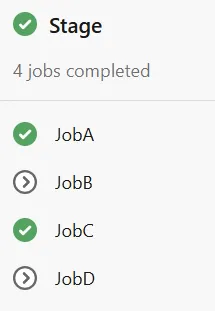
JobB depends on JobA, JobC depends on JobB, and JobD depends on JobC.
JobB has a condition that causes this job to be skipped. JobC has a condition that it is never skipped.
JobD does not have any condition at all.
Below is the yml file I used for this:
pool:
   vmImage: ubuntu-latest

jobs:
  - job: JobA
  steps:
    - script: echo Job A

- job: JobB
  condition: false
  dependsOn: JobA
  steps:
    - script: echo Job B

- job: JobC
  condition: true
  dependsOn: JobB
  steps:
    - script: echo Job C

- job: JobD
  dependsOn: JobC
  steps:
    - script: echo Job D
Results
My expectation of this pipeline was that jobs A, C, and D would run, because jobD does not have a condition at all.
The actual result is shown in the picture: jobD is skipped. But why?
The reason appears to be that a job without a condition will have an implicit condition succeeded(). This condition means: all previous jobs must succeed. For some reason a job that is skipped is not successful. This means that JobD fails, because one of the upstream jobs is skipped.
How to fix this
The fix for this problem is relatively easy: add an explicit condition to JobD. For example, check that JobC is successful:
condition: succeeded('JobC')Conclusion
If you expect that a job might be skipped in a dependency tree, always add an explicit condition to downstream jobs.
Krijg weer grip op je data en technologie
Vertel ons waar je tegenaan loopt. We denken met je mee
en laten zien wat er mogelijk is.


Ook interessant
Gebruik de pijltjestoetsen om door de carousel te navigeren. Gebruik Home en End om naar het begin of einde te gaan.